

RS-232 / Serial Functionality:
When in Digital Meter Mode the Serial output sends the Count Per Second, (CPS) detected by the Geiger counter to the PC. This is used to connect to the PC windows program. The count consists of two bytes, a high byte multiplied by 256 that is added to the low byte for the total count.When in Random Number Generator Mode, the serial output sends the random number generated out to the PC. This is a one-byte number, whose range is determined by the jumpers B4 to B6.
USAGE
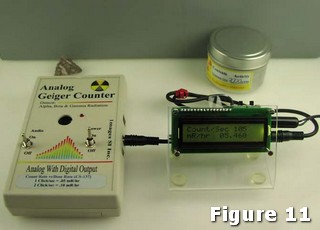
Set the switches for the units/time you want. Plug the 3.5mm (1/8”) jack into the Digital out of the Analog Geiger counter, and the opposite end of the cable into the J1 jack on the DMAD board. see Figure 11.
Turn the Geiger counter on, then turn this module on. After powering on the module, it LCD screen will stay blank for 1 second, as the module's LCD initializes. Then Screen will read “DMAD for AGC” on top line & “Counting…” on bottom line of LCD for another 1 second.
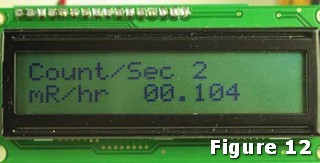
After that counts & radiation level calculations will commence as per radiation particles detected by Analog Geiger Counter. LCD screen will display counts & radiation levels as per time & units selected & radiation particles detected by Analog Geiger Counter. LCD display should now resembled to that of figure 12. If there is no display on the LCD, adjust the contrast control on the back of the Digital Meter Adapter, as seen in Figure 3.